How to Choose a Mechanical Keyboard
Your first mechanical keyboard - how to choose without getting lost among Linear, Tactile, Hot-Swap, Gasket, and 75%.
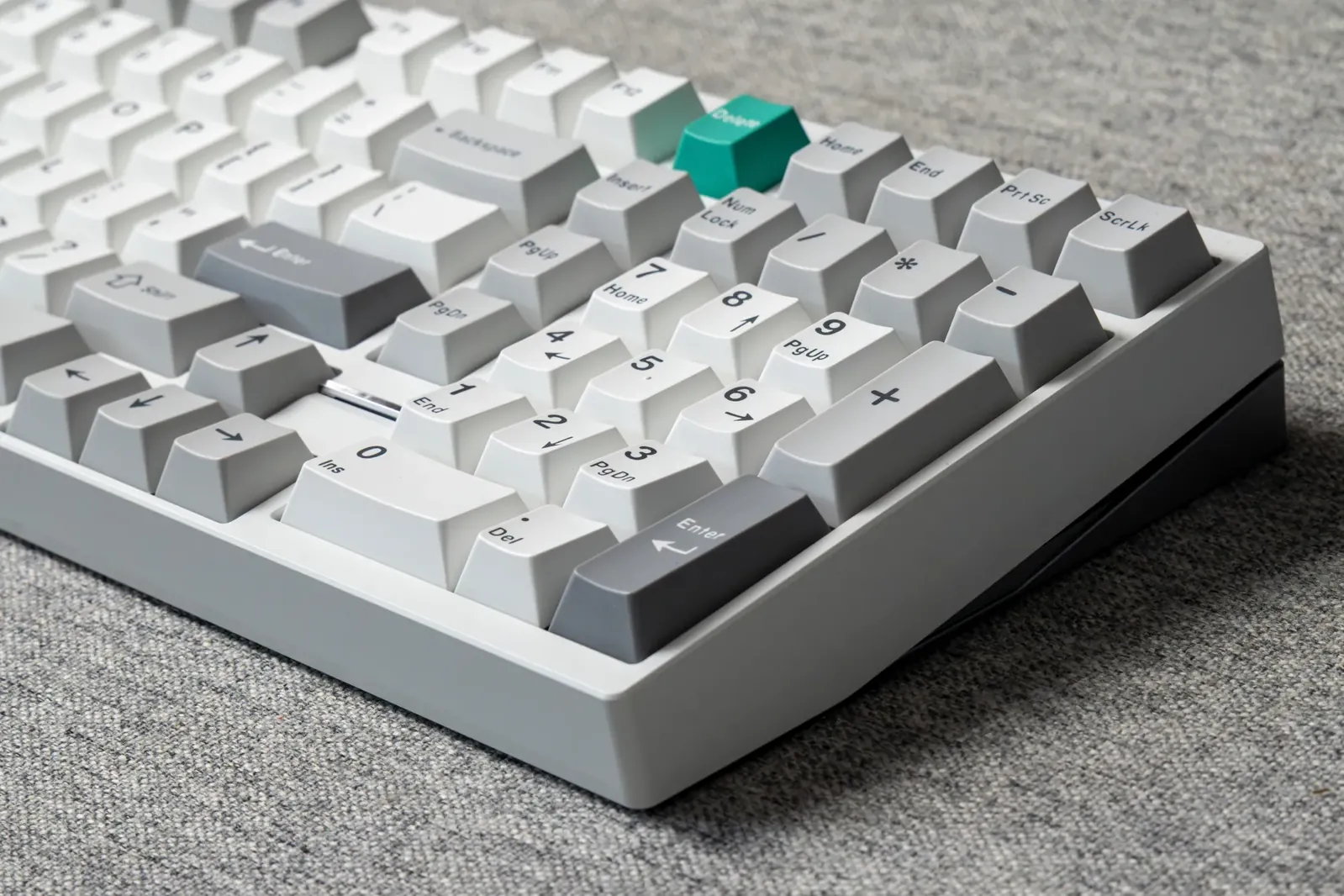
Your First Mechanical Keyboard - How Do You Choose Without Getting Lost?
If you've started taking an interest in mechanical keyboards, you've probably already come across terms like Linear, Tactile, Hot-Swap, Gasket Mount, PBT, 75%, TKL, and plenty of other concepts that can make the hobby seem much more complicated than it really is.
The good news is that you don't need to know everything to choose a good mechanical keyboard. The most important thing is understanding what suits you - your needs, your budget, and above all, the feel you enjoy.
So let's clear things up a little. ⌨️
First of All - Why a Mechanical Keyboard?
A mechanical keyboard has a separate mechanical switch beneath each key. Different switches have different feels, weights, and sounds, and that's one of the things that makes this field so varied.
Unlike a basic office keyboard, a mechanical keyboard often lets you replace switches and keycaps, change the feel and sound, and even make internal modifications.
But to me, the biggest advantage is simply the typing experience. A good keyboard can make something we do every day much more pleasant and enjoyable.
1. First, Choose the Right Size for You
Before thinking about color, sound, or switches, consider which keys you actually need.
100% / Full Size - A full keyboard, including an F-row, navigation keys, and a numpad. Particularly suitable for anyone who works with numbers a lot and doesn't want to give up any keys.
96% / 98% - Almost all the keys of a full-size keyboard, but in a more compact layout. In my opinion, this is a great option for anyone who wants a numpad without a huge keyboard.
TKL / 80% - A full keyboard without a numpad. A good choice for anyone who wants more room for their mouse while keeping the F-keys and navigation keys.
75% - More compact than TKL, but still keeps the F-row and most of the useful keys.
65% - Smaller and more streamlined, usually without an F-row.
There are even smaller sizes, but for a first keyboard, I recommend thinking twice before giving up lots of keys. A small keyboard looks great on your desk, but if you use a numpad or F-keys every day, its looks won't necessarily make up for the inconvenience.
2. Switches - The Part That Changes the Feel
This is probably the topic that confuses beginners the most, but at a basic level, switches can be divided into three main families:
Linear - Linear Switches
The keypress is smooth and continuous, with no "bump" along the way.
Personally, I really like light, smooth linear switches, and they can be great for both typing and gaming.
Tactile - Tactile Switches
During the keypress, you feel a small bump that gives your finger feedback that the key has actuated.
Some people really enjoy this feel when typing.
Clicky - Clicky Switches
In addition to feedback during the keypress, they produce a distinct "click."
This can be a lot of fun if you like that style, but keep in mind that they can be quite loud - especially in an office or shared room. 😉
There is no "best" type here. It's entirely a matter of personal preference.
3. Hot-Swap - A Feature I Highly Recommend for Beginners
If a keyboard is listed as Hot-Swap, it means you can remove and replace the switches without soldering.
In my view, this is one of the features especially worth looking for in a first keyboard.
Today you might be sure you want certain switches, only to discover a few months later that you prefer something completely different. With Hot-Swap, you don't need to replace the keyboard - you can simply try different switches.
And that's a big part of the fun of this hobby.
4. What's all this talk about "Creamy", "Thocky" and "Clacky"?
Welcome to the part where it's especially hard to describe sound with words. 😄
The keyboard community uses lots of terms to describe sound:
Thocky - a deep, full sound. Creamy - a smooth, soft, "creamy" sound. Clacky - a sharper, brighter sound. Marbly - a sound sometimes described as deep and clean, a bit like marbles.
It's important to know that the switch is only part of the equation.
The sound is also affected by the case, plate, keycaps, foam inside the keyboard, stabilizers, keyboard construction, and even the desk and the surface it sits on.
So you shouldn't buy a switch just because you heard it sound amazing in a video and expect it to sound exactly the same in your setup.
5. Keycaps make more of a difference than you might think, too
Keycaps aren't just about color and design.
Their material, thickness and profile can affect both feel and sound.
The two most common materials are ABS and PBT. Both can make excellent sets - one material isn't automatically "better" than the other.
Profile matters, too. There are profiles like Cherry, OEM, SA, MT3 and more, and each feels different under your fingers.
For a first keyboard, I wouldn't overcomplicate things: choose a set that feels comfortable, looks good to you and fits your keyboard's layout.
6. Aluminum or plastic?
As you get further into the hobby, you'll soon discover keyboards with heavy, impressive aluminum cases.
I really love aluminum keyboards, but a good keyboard certainly doesn't have to be made of aluminum.
Plastic keyboards can be excellent, lighter and less expensive, and sometimes even produce a particularly soft, pleasant sound.
Aluminum generally gives a heavier, more premium feel, but it also raises the price significantly.
For a first keyboard, I'd invest in the layout, switches and user experience first, and only then in the case material.
7. Wired, Bluetooth or 2.4GHz?
It's worth checking in advance which connection options the keyboard offers.
Many keyboards today are Tri-Mode and include USB-C, Bluetooth and 2.4GHz wireless.
For everyday use, Bluetooth can be very convenient. 2.4GHz is generally better suited to anyone who wants a low-latency wireless connection, for gaming, for example, while USB remains the simplest and most reliable option.
If you plan to use the keyboard with several computers or devices, it's also worth checking how many Bluetooth pairings it can remember.
8. Don't chase "the best keyboard"
One thing I've learned from this hobby is that there really isn't one keyboard that's best for everyone.
Some people want a firm, clacky keyboard, while others look for a soft feel and a deep sound. One person needs a numpad, and another refuses to have one on their desk. 😄
Price doesn't always determine how much you'll enjoy a keyboard, either.
So for a first keyboard, I'd look for something that meets a few simple criteria:
And yes, that last one matters, too. 😉
Most importantly - enjoy the journey
One of the things I love most about the world of mechanical keyboards is that you can always experiment.
You change switches, try different keycaps, discover what sound you like, and sometimes a keyboard you weren't excited about at first becomes something completely different after a small change.
Don't feel like you need to understand all the terminology right away or buy an expensive keyboard to "get into the hobby".
Start with what suits you, experiment, learn - and above all, enjoy the hobby.
And if you have a question or can't decide on a keyboard, switches or keycaps - you can always talk to me. 💜
Gali | GaliKey